Pages

Showing posts with label microassignments. Show all posts

March 27, 2019

The Value of SMALL Data and Microassignments

I'm taking a few minutes this morning to write a post inspired by a Twitter convo yesterday with Yang Fan.


What I want to do here is report on my use of small data to help me in my teaching. I don't have any big data, and I don't want any big data.


Instead, I design my classes so that I get the good, small data I need to help my students make sure they are making progress so that they can pass the course.


It's not rocket science; in fact, it's very simple. That's the point! Here's how it works:

Microassignments. My system depends on using microassignments in my classes so that I can see how things are going from week to week and help students who are not making good progress. Everything in the Canvas LMS works against using microassignments (that's a topic for a separate post), but I am committed to microassignments; this approach is good for the students, and it's good for me too. I've written about this in my Canvas Community blog, and I've copied over two of those blog posts here:
Microassignments and Completion-Based Grading
Microassignments and Data Analytics

Weekly Data. So here's what my data analysis looks like right now, based on manually transferring my students' points week by week into a spreadsheet (because god forbid that the Canvas Gradebook, a faux spreadsheet, actually let me conduct my own analysis of my own data); this is at the end of Week 9, sorting from high to low for the number of weeks a student has been failing the class:


That little snapshot of data tells me a lot! It tells me that right now, out of 90 students in the class, there are 9 students who are not passing, and that has been steady most of the semester, with around 7, 8, or 9 students in trouble in any given week. For me, that's important; I know there are always going to be students who are struggling in a class. If I were seeing a lot more students struggling, I would need to think about some major class redesign, but at this level, I am more focused on working with the individual students rather than some larger course redesign effort.

Something else you can see there is that the cohort of struggling students has changed over the semester. There is one group of students who have been struggling from the very start, another set of students who have just recently fallen behind, along with a set of students who found a good routine for the class and are no longer in trouble. That's what I learn from sorting on the number of weeks students have been in the danger zone.

Data for communication. But the way I usually look at the chart is what you see below, focusing on the students who are currently having trouble by sorting on the current week's column:


Each week I communicate with the students who are currently in danger of not passing the class, but how I do that varies from student to student. I can eyeball the chart to see if they made good progress from the previous week, and if so I can send them an email of encouragement to keep on doing more of the same. By this point in the semester, I also know each student's story, so I can also take that into account when I write to them (e.g., overwhelmed by school, by work, by health problems, by life problems; every student has their own story). I have other columns in the spreadsheet that make it easy to get a fuller understanding of what is going on with each student because I have links to their class blog, their course project, along with their email addresses (I cannot stand the Canvas Messaging system and never use it unless I have to; that is also a subject for a separate post).

Data. Real Data. For me, this system works great. Every piece of work the students do for class is reflected here: their reading, their writing, their class project, their participation at other students' blogs and websites, all of their work for the course leaves a digital trail that is reflected here in those numbers. The numbers are not the work itself, but they are a good enough proxy, and I can then use the links right here in the spreadsheet to access the students' blogs and websites, seeing the work itself with a single click. For example, here is a link to my blog for the class as a student; the different types of assignments have their own labels so it's easy to browse the blog by type of assignments and/or by week of the semester. (I need to write up a post here sometime about my #TotalCoLearner experiment where I take one of my classes each semester as a student, doing all the work just like a regular student; it's so helpful!)

By contrast, the Canvas Gradebook is useless to me, so in another post I will chronicle in more detail the failure of Canvas to help me track the data I need, along with the uselessness of the data that Canvas provides me with instead. Sure, Canvas has data about my students (all those clicks! all those eyeballs!), but the data that Canvas collects is meaningless because it understands absolutely nothing about my course design. Not to mention that it knows nothing about my students and their stories.

But more on that later. For now, I just wanted to sing the praises of small data and how it makes it possible for me to keep up with my 90 students and their progress at a cost of just 10 minutes or so of my time each week.


Microassignments and Data Analytics


I've copied and pasted this old post from my Canvas Community blog in order to reference it here.

Microassignments. Each week of my class students have a set of 6 core assignments plus up to 8 different kinds of extra credit assignments they can complete (here's what a week looks like). Each assignment is worth 2 or 4 points depending on whether it is something quick (maybe 10-15 minutes) or something that takes more time (maybe 30-60 minutes). I ask students to spend appx. 5-6 hours per week on the class, which is the equivalent of 3 classroom hours plus 2-3 hours outside the classroom; the difference is that we have no classroom time since I teach fully online, so all the time that the students spend doing work for the class is active work: read, writing, interacting with each other. There are 30 points every week over a semester of 15 weeks. Students can decide whether they want to complete points for an A, B, or a C (here's how I explain that to them), but I don't get into any of that; I have literally no idea how many students in my class right now are headed for an A or B or C; the students record their points in the Gradebook themselves (here's how that works). My only goal is that everybody should pass the class with at least a grade of C, so that is the only thing I track, and in this blog post I want to show how easy it is for me to do that using a simple spreadsheet.

Analytics. So, on Monday afternoon, after each week is over, I go into the Canvas Gradebook and sort the total points from low to high. I manually transcribe the names and points of any student who has less than a passing grade (70%) for each of the three classes that I teach based on the total points so far. So, for example, last Monday was the end of Week 13. There were 390 points possible thus far, so I recorded the name and points of any student with fewer than 273 points. It takes literally just a couple of minutes to copy out the names and points, and then I paste that into my spreadsheet. You can see the result here; this shows all the students who were failing the class at any point during the semester, with their points in the weeks column, plus one column that tracks automatically how many weeks they were failing. That's literally all the data I need in a single screenshot to show how I measure course progress. The completely steady schedule plus the fine-grained microassignments make this a reliable set of measures. As you can see, some very stable patterns emerge here:


Here's what I see in that data:

Number of students failing. This is the total number of students who, in that given week (column) did not have a passing grade. As you can see, there is a large group of students there at the end of Week 2; a total of 16 students. These are the students who didn't understand at first that they really have to do work for the class every week. They slacked off in Week 2, and they could see immediately the results: not good! Of those students who were failing at the end of Week 2, 6 of them got on track and basically did not have any more serious trouble. Then the total number of students who were failing was pretty steady (between 8 and 11 students) every week up until Week 12. At that point, when they could see the end of the semester approaching, a few students really got their act together, and now I am down to just 5 students who are in real danger of not passing. That's out of a total of 90 students.

Failing weeks per student. This is another way to look at that same data in terms of the number of weeks in which students were failing the class. There is a group of 9 students that just spent 1 or 2 weeks in the danger zone, and of that group only 1 of them is in real danger now (they only recently started having trouble with the class). There are 2 students who spent 5 or 6 weeks in the danger zone, but they both pulled themselves out of trouble by Week 8 and did not have any trouble for the rest of the semester. Then there is the group of 8 students who have been in trouble for more than 10 weeks, and 4 of those students find themselves still in danger of failing now in the last few days of the semester.

These are the only students that I communicate with about their class progress. I send various kinds of assignment-based reminders to the class, especially at the start of the semester when people are developing their class routines, but the only students I communicate with about their overall course progress are the students who show up here on this spreadsheet, the students who are not currently passing. Every Monday after I transcribe the points to the spreadsheet, I send an email to the students who is failing. Sometimes it's a generic email that I send to the students BCC, but sometimes it's an email to the individual student. As I get to know more about them and the problems they are facing (lack of time, procrastination, personal troubles, etc. etc. -- each student's story is different), I can try to use what I know to write useful and encouraging emails that are forward-focused on what they can do to get on track for the class.

Note that this is just a small percentage of my students overall in the class. There are 90 students total, so that is fewer than 20% of the students who even appear here on the spreadsheet at any time, and fewer than 10% who have been seriously struggling. I'm still optimistic that all of them will pass, which is my goal for the semester. Last semester everybody passed, so that was a good semester for me. I'll post an update here on Friday when I see how this semester turns out.

UPDATE: WHOO-HOO! EVERYBODY PASSED! That makes me very happy. I also wrote up a post about end-of-semester evaluation comments from the students, including comments re: grading, here:
End-of-Semester Evals: Grading and Creativity


Microassignments and Completion-Based Grading


I've copied and pasted this old post from my Canvas Community blog in order to reference it here.

In my first posts in this series I gave an overview of my rejection of punitive "bad" grades and also my rejection of so-called "good" grades. In this post, I will provide an overview of my solution to these problems, where I give my students feedback about their work, but they do the grading.

I sometimes call this approach "all-feedback-no-grading" because, from my perspective, that is how it works: I give lots of feedback, but I never put a grade on anything. Students decide what grade they will get, not assignment by assignment but through their overall work in the class.

Again, this is just an overview, and I'll get more specific in later posts. Meanwhile, please feel free to ask questions, and that will help me know what to address in those future posts! I've been using this system for so long now (over 15 years) that it is totally familiar to me, and it's sometimes hard to gauge just what is self-explanatory and what actually needs explaining.

Microassignments

I use microassignments in my classes. I made up the term microassignment to convey the idea that there are no big, high-stakes assignments of any kind. Some of these little assignments take just 10 or 15 minutes to complete; others might take as much as an hour, but not more than an hour — unless, of course, the student gets excited and wants to spend more time; sometimes they do, especially when they are working on their class project.

I advise students to budget a total of 5-6 hours to spend on my class each week; how they schedule that time is totally up to them. Because the assignments are small, students can work on them in short snatches of time, or they can sit down and complete several assignments in a longer study session; it's all up to them. I love teaching online for just that reason: I am glad to take advantage of any time the students can find for this class.

Success is the sum of small efforts,
repeated day in and day out.

Gradebook Declarations

As students complete each microassignment, they record the completed assignment in the Gradebook using a "Gradebook Declaration," which is actually just a true-false quiz. The quiz contains a checklist of all the requirements for the assignment to be complete, which is more or less detailed depending on how complex the assignment is.

I include the checklist text in the assignment instructions, as you can see here: Week 1: Storybook Favorites

The Declaration checklists are also a good reminder to them about exactly what they need to have done for the assignment to be complete. Students answer "true" to indicate the assignment is complete and, presto, the points go into the Gradebook.

There is no partial credit; students get credit for completed assignments only. If they start an assignment, but do not have time to finish it, they can finish it the next week; everything rolls forward that way, so no work is lost.

The students do all this grade-work themselves. As they complete each and every assignment, they do a Gradebook Declaration. They find it a little strange at first, but they quickly get used to it. Admittedly, getting the students to slow down and read the Declaration sometimes takes a little work on my part at first; a few students start out treating the checklists as a kind of terms-of-service which they agree to without reading, but when I follow up with them about that, there are no further problems. Because every assignment leaves a digital trail at their blog or at their website, there is clear accountability. They know that; I know that. During the Orientation week, I watch all the blog posts carefully to make sure students understand how the system works.

Student Choice

There are many assignments students can choose to complete each week. Take a look here for a typical week:
Week 3: Myth-Folklore and Indian Epics.
(I have the same assignments in both classes; it's just the content that is different.)

As you can see there, each week has six "core" assignments which provide a week-long workflow: two reading assignments, a storytelling assignment based on the reading, blog commenting on other students' stories, a semester-long project, plus feedback on other students' projects. Most students complete most of the core assignments. Those assignments add up to a total of 30 points each week.

In addition there are eight "extra" assignments, and those add up to 20 points each week. Students can use those to make up any of the core assignments they missed. They can do extra assignments if they want to do more of something (more reading, more commenting, more technology, etc.). Students can also use the extra assignments as a way to accumulate points if they want/need to finish the class early. It's all good.

So, there are 50 possible points each week, but there is no expectation that students would do all that work. The idea is that they CHOOSE what assignments to do. They can focus on the core assignments and only on the core if they want, or they can mix in extra assignments. They can also work ahead if they want. It's all up to them.

Class Progress

As the points accumulate week by week, students can see if they are on target to reach their desired grade. Some of my students want/need to get an A. Some of them just need to pass the class with a C to graduate. Some of them can even take a D and have the class count for graduation; I always tell them to check with their advisor about that, though, because Ds do not always work for Gen. Ed. credit or for financial aid. Here's the chart they can use to track their progress: Progress Chart

My own goal is just that every student should pass the class. As far as I am concerned, this is a P/NP class. Whether a student wants to get an A or B or C makes literally no difference to me, and I do not know until I check the Gradebook at the end of the semester who is getting what grade; I only monitor the Gradebook for students who are in danger of not passing the class. More about my DIY data analytics here:
Microassignments and Data Analytics

Yes, It Works!

Yes, this is all kind of weird... but the students really like it. Here is every comment students have made about grading in my end-of-semester evaluations since we went digital back in 2010: Grading: What Students Say

I've been using this system, largely unchanged, since I started teaching online in 2002. The reason I haven't changed it much is exactly because of that student feedback: it works. Students like it. Students REALLY like it. And they like it for the reasons that are important to me: they feel in control of their grade, they are not stressed, it encourages them to be creative and learn a lot.

When I introduce this admittedly strange grading system to the students in their very first assignment for the semester, I include a link to those student comments. I can go on (and on and on) about the advantages of this system, but the most powerful words come from the students themselves! Here's how I introduce all this on the first day of class:
Designing Your Course

Thoughts from a Brand-New Student...

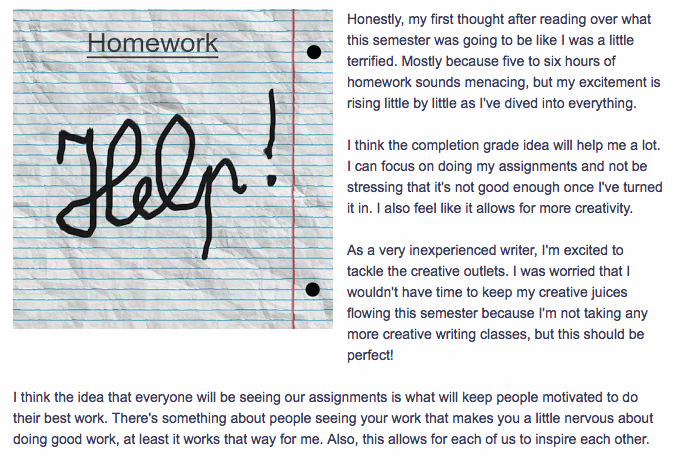
And since some of my students have started already for Spring 2019 (flexible schedule also means starting early if they want), I will share this screenshot of a blog post that popped up literally just a few minutes ago. I think this says it all; one of the Orientation Week assignments is for the students to let me know if this all makes sense and what they think. Here's what one of the students is thinking right now, at this moment. And it sounds good to me! This student understands not just how the course works but why it is set up this way, and I am excited to see what she will do with the reading and writing as she moves on to Week 2, and I'll see how that goes right there in her blog.


And maybe that should be the subject for my next post: how blogging and other visible student work is an important part of the shift from grading to feedback! More on that tomorrow. :-)